|
Here is part 2 of my in-depth tutorial on how to create realistic HDR photos. In part 1 I mainly used Photomatix and then I made a few simple adjustments in photoshop. Part 2 focuses mainly on my workflow in photoshop, though I also add a few adjustments in lightroom. Part 2 is mainly about contrast and colour adjustments, then manual blending of certain areas of the photo from other exposures, adding a few filters from Topaz Labs and Nik software, and then blending those effects with the photo layers in photoshop. Last part of this video is about perspective correction. Part 1 and 2 together are a full on in-depth HDR photo tutorial, so if you are into HDR photography, I hope you find them helpful. Enjoy! This is part 1 of two video series on creating realistic HDR images in HDR software and photoshop. Although I am using HDR Efex Pro 2 as much as I use Photomatix, this video is about the latter, and then part two focuses on adjusting details in photoshop. I have a separate video on digital blending, which is a fully manual process used for creating HDR photos, and ou can watch it on my Youtube channel. HDR is great for creating amazing phoptos when your camera cannot capture the entire dynamic range of the light that is present in the scene that you captured. Blending a few exposures is then essential to be able to bring all the details back. Whenever you lift your camera to your eyes and think of taking a photo you should already know which direction you want to go with it artistically speaking. When I press the shutter, I have a complete vision of the final shot. I usually know exactly what I want to do with it in postproduction, whether it will be an HDR image, or a straight forward editing in photoshop, I can see those final touches in the RAW file before I apply them. Having a vision is crucial in any type of art. Night photography is fantastic for this, as you need to take your time. Use the tripod to slow things even more. Compose, align, feel the scene, read the light, dive in the shadows, and live the scene. This video tutorial discusses my thought flow reasoning behind taking photos, and then the editing process. Incidentally, if you want to watch a detailed tutorial on digital blending, then watch this movie here. This short photoshop video tutorial is about adjusting and tuning your Adobe Camera Raw for best performance and results. I will show you which colour profile to pick, what resolution you should set and which bit range to work in. Also, the second part of this tutorial is about synchronising and saving settings and image adjustments, so that you can use them with other images, or apply the same settings to any image at any time in the future, without the necessity of guessing and redoing the entire process from scratch. For more free photoshop tutorials and photography tips, subscribe to my YouTube channel. In this tutorial I will show you my full workflow and how I created this image of a night scene in central Tokyo, that I took yesterday. The video shows not only what I do but also why I do it. Digital blending is a very powerful though time consuming technique, then again, if you want to bring your photo editing to another level, the best shortcut is no shortcut at all. Digital blending is a fully manual process, where an HDR photo is created from scratch, by masking and blending a few exposures in photoshop, or any other program that allows it. All of my HDR photos are manually blended to some extent, even if I am using HDR Efex pro 2 or Photomatix to creat the HDR image base. I find that digital blending give the best and most realistic results, though as I said, it can take time and requires patience, even though the technique itself is not that complicated. Final photo in full HD can be viewed here. Summer is at its full and fireworks shows are happening all over the northern hemisphere. In this video I will give you tips on what equipment you need to shoot great fireworks photos, how to set up your camera (ISO, aperture and shutter speed), what techniques you can use to make your fireworks shots look different, and finally I will edit one of my photos in photoshop, and show you my workflow. In fact, the photo that I am editing is a composite phot, meaning, it is made of two different shots. So you get three tutorials in one. Enjoy! HDR stands for Hight Dynamic Range, and it is a method quite common in today's photography. HDR concept is based on capturing few different exposures (usually it is 0, +2 EV and -2 EV, where EV stands for exposure value). So what does this mean? Well, human eye can see 11 stops of light, or more, whereas camera can see only 3 or 4. So when you stand staring at the sunset, your brain will register much wider range of light (dynamic range) than the camera. So, by capturing and merging together different exposures, one can create a photo which has much more data in both highlights and shadows. In this video tutoprial, I will give you 10 great tips on how you can improve your HDR photography experience. If you want to watch a full length tutorial on HDR image editing, please see this video. This video is a bit long (approximately 45min. long) but the aim was to show not only my full workflow, but also how i think and perceive the image changed throughout the whole process of photo editing in photoshop. The bonus information are all the tips that I give you on portraiture photography, and additional hints of postprocessing, that go outside the subject of this tutorial. The pace of the video is not fast, and I did not want to rush it on purpose, so it is easy to follow for anyone who starts in photography. Photo editing techniques are quite basic as well, and I also introduce you to some photoshop plugins, which I am using all the time, in nearly every photo. The trick to using the photoshop plugins like Topaz or Google software (former Nik software), is to know how to tweak the presets, and how to stack the filter effects. For more free photoshop tutorials please visit my Youtube channel. I bet you saw many images online that were shot during daytime and you were puzzled how come the skies are so smooth or water is so silky. Well, that is a trick used by photographers for many many years now, and it is usually achieved by attaching an ND (neutral density) filter to the lens. ND filter is nothing more but a piece of glass that reduces the amount of light that travels through the lens onto the sensor, which allows for slowing down the shutter speed. However, even though using ND filter gives probably the best and most natural looking results, you can fake that effect in photoshop, and it is not difficult at all! Watch this video tutorial to find out how it is done. For more photoshop tutorials visit my Youtube channel. Here is my next composite photo manipulation created from a boudoir shot of a Japanese model Asuka that I shot last week. If you want to learn more about composite photography, see this article and video tutorial here. Composite photography can be lots of fun so if you have photoshop, go ahead and have some photo manipulation fun. It is a great way to learn composition, light, colour management, and photoshop tools. 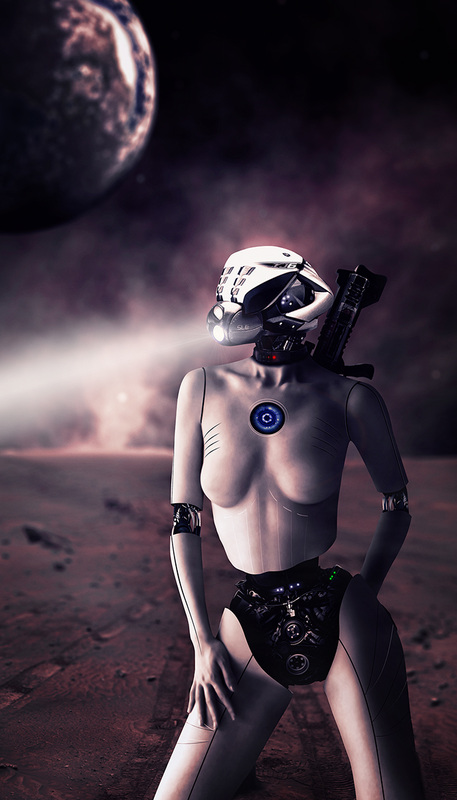
Composite photography is one of the most creative types of this amazing visual art. It allows for manipulating not just one photo but putting many photos together. It is a great way not only to learn composition of a photo, developing one's artistic skills, but also mastery of the photoshop tools. In this tutorial I am using a background photo and another complex composite shot of a Japanese model, which I converted into a cyborg or an android sci fi vision. Just so you know, both photos were shot by me in Tokyo, so this makes it even more cybertron-like. Anyways, I hope that this tutorial will help you guys with creating better composite images. Clone stamp tool is one of the most powerful tools in photoshop, and I am sure you all use it quite often during photo retouching. Personally, I use the clone stamp tool a lot when I edit my urban shots or architecture shots, where the patterns are geometrical and precise. In such cases the use of content aware based tools is usually not the best idea. But most of the architecture shots will involve a perspective, meaning, that objects that are further away will appear smaller than those closer to us. So, if you use a clone stamp tool as it is in photoshop tool menu, then when you sample a given area, no matter where you stamp it on the canvas, the size of that sampled area will not change. In other words, the sampled area close to the camera, will match the same pattern positioned further from the camera. In this video I will show you how to use the clone stamp tool in conjunction with the vanishing point filter in photoshop, and teach you how you can clone stamp in perspective. For more photoshop tutorials and photo editing tips and tricks, please visit my YouTube channel. Black and white photography is timeless. Its simplicity and beauty, which is based only on 256 tones, is unsurpassed. However, it is not an easy task to create a good black and white photo. In order to do so, one has to think and see in black and white before the shot is taken. Certain colours, such as green, red, brown, or blue, will distinguish themselves in a colour photo, but once converted to black and white the visual difference between them may be dramatically reduced, causing the whole scene to look bland and boring. The key to a good black and white photography is knowing how to manipulate with light and dark tones and the contrast between them. Post processing of a black and white photo may take much longer, and may require much more precision than one would normally need for a colour photo. Why? Watch this video and find out. In this photoshop tutorial I will show you how you can massively improve the visual impact of your photo by using simple photoshop tools, such as curves, or layer blending. In this tutorial I am using two photographs, one in black and white, and the other one in colour. It is a simple method, and suited for everyone, both the beginners and more advanced photoshop users. By simple adjustments in contrast, or the difference between saturation levels in the photo, you can make huge changes and alter the look of your photo tremendously. It is always good to go back to your photo after some time, and see if you can improve it, too. Perspective distortion is often an overlooked step in photo editing. I often see online great shots with great composition and lighting, but the distorted perspective ruins everything at the end. In this short video tutorial I will show you how I fix perspective distortion in photoshop. Three methods of dodging and burning in photoshop that I find to be the most effective ones6/15/2014 In this next photoshop tutorial I am talking about three different dodging and burning techniques that I use whenever I retouch my photos. I discuss the dodge and burn too which is a built-in function of photoshop, also the doging and burning via applying curves layers, and lastly, frequency separation based dodging and burning. Dodging and burning is a crucial step in every photo retouching, yet often overlooked. It really gives the photo the refined and polished look, and it is one of those photo retouching techniques that should be learned. I am creating 2 photoshop tutorials per week. If anyone has a question regarding any of my tutorials, or wishes me to discuss any particular photoshop technique, please feel free to leave a comment under this post, or contact me at ponte@ryuurui.com Here is my new tutorial on photoshop techniques and photo retouching. In this episode I will show you another method of making skin smooth without destroying all the texture. If you want to watch a video on more advanced skin retouching technique, then please see my video on frequency separation on my YouTube channel. Here is another photoshop tutorial in which I will discuss the issue of composition in photography and its importance. I am talking a bit about the rule of thirds, and general idea of how to compose a photo, based on one of my own captures. I am also explaining how to deal with composition issues in photoshop through blending layers, ands using tools such as "blend if", layer masking, etc. For more video tutorials on photoshop please subscribe to my YouTube channel. Today, I published my next video tutorial. In this episode I will show you how you can bring your night photography editing to another level by masking beautiful bokeh of night cityscape lights onto the original image. For more tutorials visit my Youtube channel. You will find there photoshop tips and tricks, HDR photography tutorials, photography techniques related tutorials In this next episode of my photography tips and tricks and photoshop tutorials I will explain not only how to recognise camera dust in post processing, but also talk about how the dust gets into your camera, how to reduce the dust spots on your photo by adjusting aperture, and show you many photoshop tools that can be used to deal with it during retouching, including removal of camera dust from complex textures, such as architecture. If you are interested in my other photoshop tutorials or HDR photography tutorials, please visit my YouTube channel. Here is another video tutorial on photoshop and lightroom techniques. In this episode I will guide you through a process of retouching eyes, from basic clean up, through increasing the brightness of the irises, adding or enhancing catch lights, accentuating eyebrows and eyelashes, and even on how to use the liquify tool. This is a second part to my other video on skin retouching, which can be found here. Here is my next tutorials on photoshop tips and tricks, and in this episode I talk about my techniques for skin smoothing and how do I deal with skin tone transitions from dark to bright. I am discussing the frequency separation skin retouching, which is a non destructive way of working on a photo, meaning that you do not change the pixels on the actual photo, but the entire work is done on separate layers in photoshop. In this tutorials I work with various tools, which should give you a good starting idea on how to retouch your portraits, or boudoir photography, or any photos with people as your subject. Many thanks to Jamosa Ladiva, who was modelling for me during that photo shoot, and kindly agreed for me to use her photo in the tutorial. My other tutorials are available on my YouTube channel. My new photo editing tutorial on how to transform the mood in your photo into a steampunk coolness. In this video I am working on a photo that I published in my article on Japan in Photography, which you can find here. Also, check out my other video tutorials. I have launched a new menu on my website, titled "photography tutorials", where I will be posting my youtube channel videos on photography techniques, and image post processing. I plan to cover many various subjects in my videos, though my main focus will stay with HDR image capturing and post processing, as well as the photo processing software, such as HDR efex pro 2, photomatix, photoshop, lightroom, topaz and nik software products, and so on. You will find there both short and long video tutorial for beginners, intermediate and advanced levels. In the future I also might venture into photo manipulation, composite photography and digital art. You can find all my videos on youtube channel, this site here, or my google+ account. Suggestions, ideas, and requests are more than welcome! For cool daily photos from Japan, visit my blog at www.japan-in-photography.com! |

Categories
All
AuthorPonte Ryuurui (品天龍涙) Archives
August 2020
|
 RSS Feed